Docs
srooter is the control plane for your team's coding agents. Developers code with srooterctl. Every request goes through the srooter API, where your team controls model routing, budgets and policy, with a central audit log.
Getting started
Install srooterctl and the coding agent with one command, then sign in. login opens a browser to approve the machine, which gets its own key (approve from any browser, so it works over SSH). Coding needs Node.js 20 or newer.
curl -fsSL https://api.srooter.ai/install.sh | bash
srooterctl login                     # approve in your browser
srooterctl                           # coding session in this directory
srooterctl -p "fix the failing test" # one task, then exit
New here? Sign up first (email one-time code; it creates your org). The Download page has Studio for Mac too.
Optional: route Claude Code or Codex through srooter
srooterctl does not change Claude Code or Codex unless you ask. enable shows the exact config change before it writes it, and running it again changes nothing.
srooterctl enable claude    # Claude Code, via ~/.claude/settings.json
srooterctl enable codex     # Codex, via ~/.codex/config.toml
curl -fsSL https://api.srooter.ai/install.sh | bash -s -- --with-claude-codex   # both, at install
Other tools
The gateway has two endpoints: Anthropic-native at /anthropic/v1/messages and OpenAI-compatible at /v1/chat/completions. Point a tool at one of them with an srt_ key from the dashboard. Full setup: Claude Code, Codex and other tools.
Anthropic-style tools
ANTHROPIC_BASE_URL=https://api.srooter.ai/anthropic
ANTHROPIC_API_KEY=srt_xxx_yyy
aider / OpenAI-compatible clients
OPENAI_BASE_URL=https://api.srooter.ai/v1
OPENAI_API_KEY=srt_xxx_yyy
Claude Code, Codex and other tools
The simplest path is srooterctl login then srooterctl enable claude or srooterctl enable codex. That reuses the key srooterctl saved for this machine. An API key from the dashboard is only needed when you wire a tool by hand, or for direct API calls.
How enable wires each client
Claude Code goes through srooter's edge (safe for prompts that contain code), pinned in ~/.claude/settings.json, which Claude Code reads on every session, including --continue and IDE launches. Codex gets a srooter provider in ~/.codex/config.toml: it ignores OPENAI_BASE_URL, so env vars alone would send your key to OpenAI and fail with 401. Restart open sessions after enabling. Moving a session over? srooterctl --continue-claude (or --continue-codex) picks it up in that folder.
Wire Claude Code by hand
Add an env block to ~/.claude/settings.json. This skips the edge, so requests whose prompts contain code can be blocked by the hosting firewall. Prefer srooterctl enable claude.
ANTHROPIC_BASE_URL=https://api.srooter.ai/anthropic
ANTHROPIC_API_KEY=<your key>
Wire Codex by hand
Merge into ~/.codex/config.toml (top-level keys before any [section]), with SROOTER_API_KEY set. A Model metadata for 'glm-5.3' not found warning is harmless. This also skips the edge.
model = "glm-5.3"
model_provider = "srooter"

[model_providers.srooter]
name = "srooter"
base_url = "https://api.srooter.ai/v1"
env_key = "SROOTER_API_KEY"
wire_api = "responses"
Route one session, or stop routing
srooterctl shell            # routes only this session; exit to leave
srooterctl disable          # new terminals stop routing through srooter
srooterctl claude-env off   # Claude Code stops routing through srooter
eval "$(srooterctl on)"     # route this shell in place (off: restore)
A quick API check
Replace the model with one your org has enabled.
source ~/.srooter/config   # loads SROOTER_API_KEY (saved by srooterctl)
curl https://api.srooter.ai/v1/chat/completions \
  -H "Authorization: Bearer $SROOTER_API_KEY" \
  -H "Content-Type: application/json" \
  -d '{"model":"<your-model>","messages":[{"role":"user","content":"hello"}]}'
Other tools
Cline, Roo Code, Kilo Code, Continue, Cursor, Zed, OpenHands and OpenCode: provider OpenAI Compatible, base URL https://api.srooter.ai/v1, and your srt_ key in the tool's settings (not a file you commit). aider:
source ~/.srooter/config   # loads SROOTER_API_KEY (saved by srooterctl)
export OPENAI_API_BASE='https://api.srooter.ai/v1'
export OPENAI_API_KEY="$SROOTER_API_KEY"
aider --model openai/deepseek-pro
Not supported in front of srooter yet: Windsurf, Gemini CLI and Antigravity. srooter can still serve those models as backends.
Troubleshooting: a session isn't going through srooter
Symptoms: the agent only describes edits instead of making them, your audit log shows little or no traffic, or your policies don't apply. Run srooterctl doctor in that terminal: it shows exactly what failed.
- Claude Code: installed, NOT routed through srooter: run srooterctl enable claude, then restart the session.
- gateway probe: FAIL (401): your key is invalid or expired. Run srooterctl login again, or paste a fresh key with srooterctl repair --key-stdin (hidden input).
- A local model-routing wrapper that hands coding to another CLI competes with srooter: turn it off in that repo.
What's new
Jul 2026 · new model
Kimi K3 (kimi-k3), Moonshot's flagship, now routable
2.8T params, up to 1M context, native visual understanding. In our agent-build benchmark it scored 8/8 with 5/5 UI polish, matching Opus, Fable, and GPT-5.6-sol. It used the fewest iterations and cost ~$3.60/build: half of Opus, a third of Fable. Of the nine models tested, it is the lowest-cost model with a 5/5 UI score. See the benchmark →
srooter Studio, the desktop app
srooter> Studio is a macOS app for coding through srooter. It needs no environment changes, runs TDD with functional and visual validation by default, and gives the agent your code graph for project context. Every request goes through the gateway (routing, budgets, policy, audit). Signed and notarized, for Apple Silicon and Intel.
↓ Download for Mac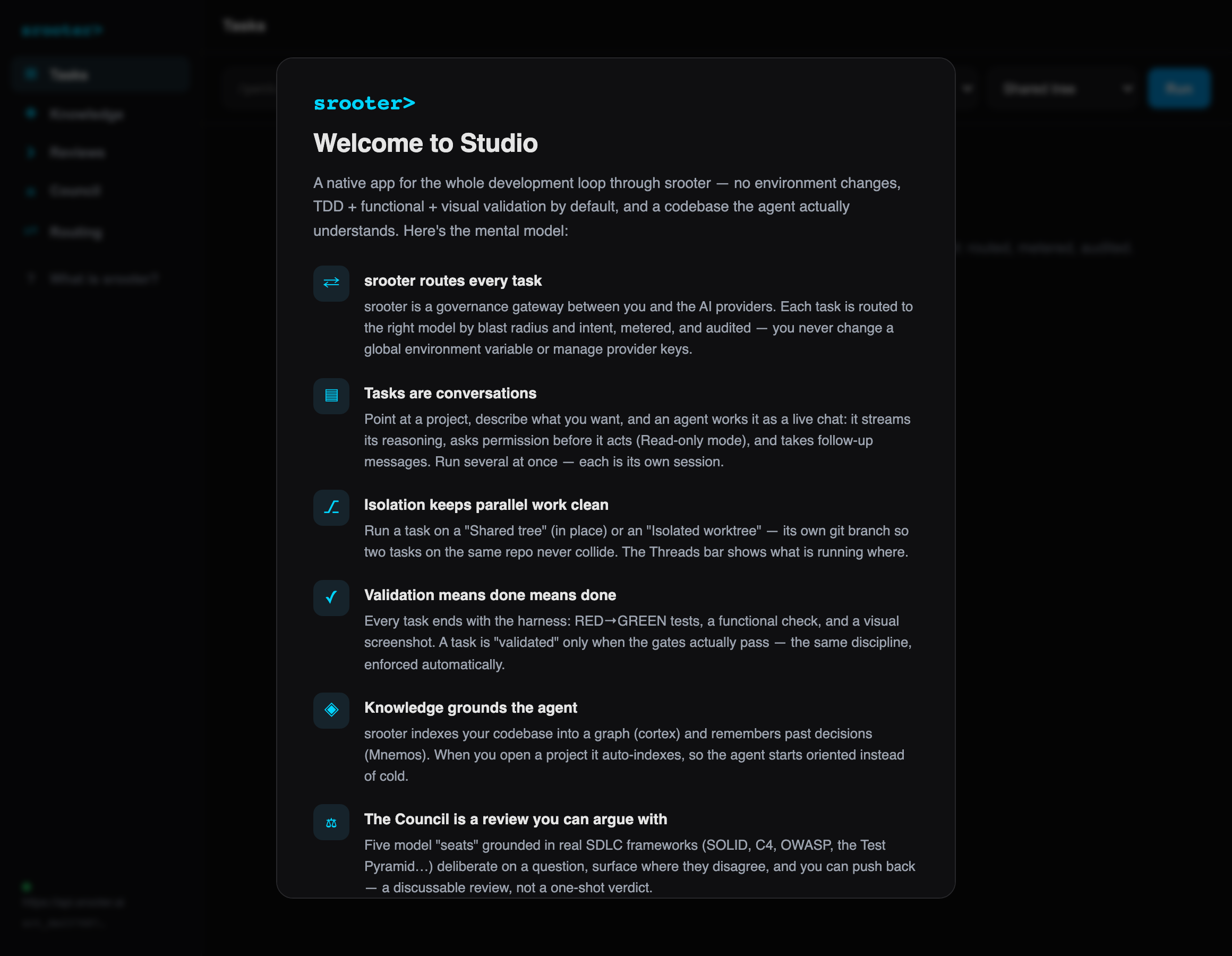
Everything in one window
- Tasks point at a project, describe what you want; an agent works it as a live chat, streaming its progress and asking before write and shell actions. Run several in parallel (shared tree or isolated worktree).
- Sessions your past agent sessions, grouped by day; resume one where it left off.
- Knowledge the cortex code graph plus Mnemos session records. The graph indexes when you open a project, so the agent starts with a map of the code. Refresh the Agent Codemap here too.
- Council five models review a change using SOLID, C4, OWASP and the Test Pyramid. You see their findings and disagreements, and can challenge a finding.
- Reviews paste a GitHub PR link (or review your local diff) for a grounded council review.
- Routing see which model each tier routes to and why (read-only; edit on the web dashboard).
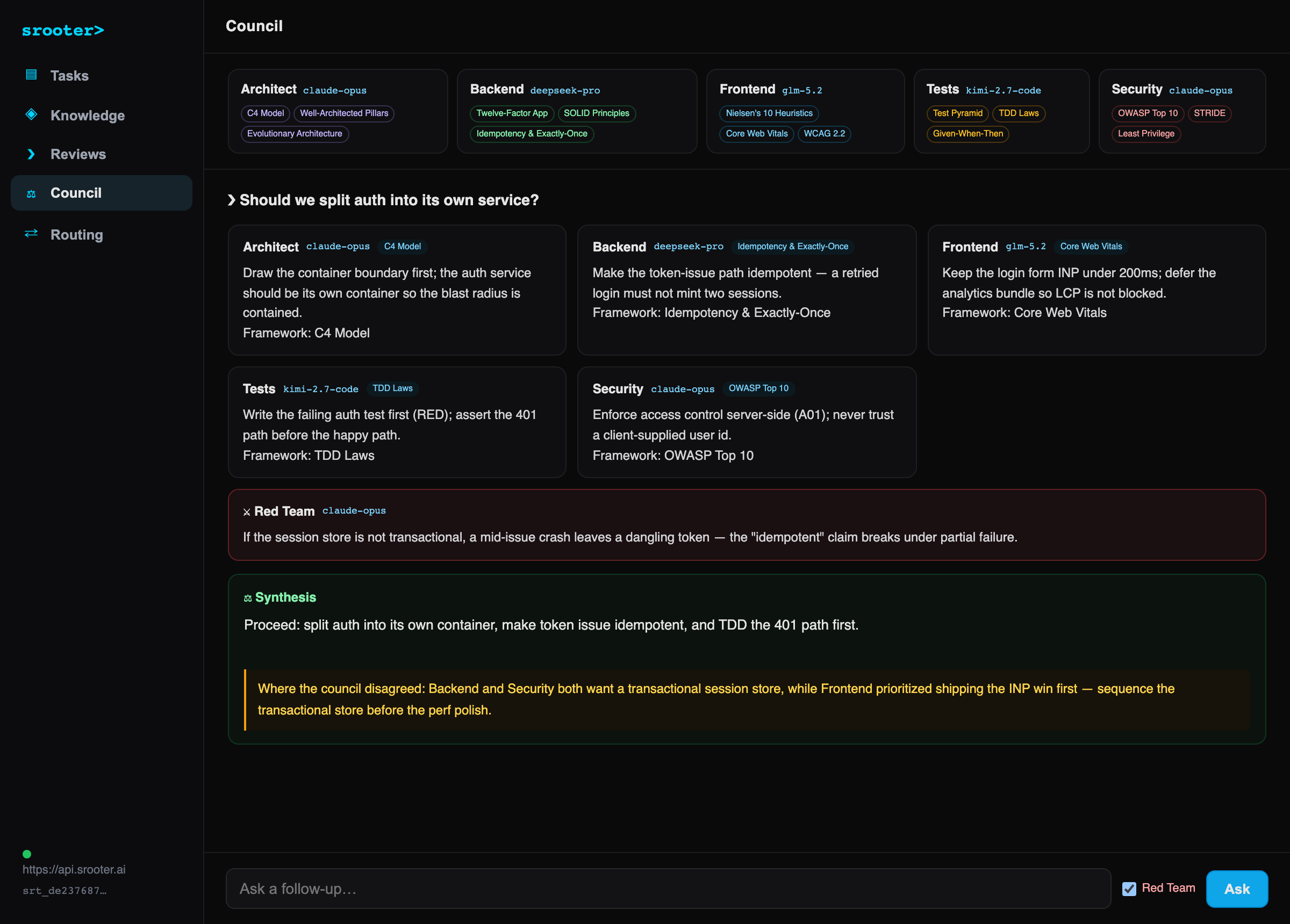
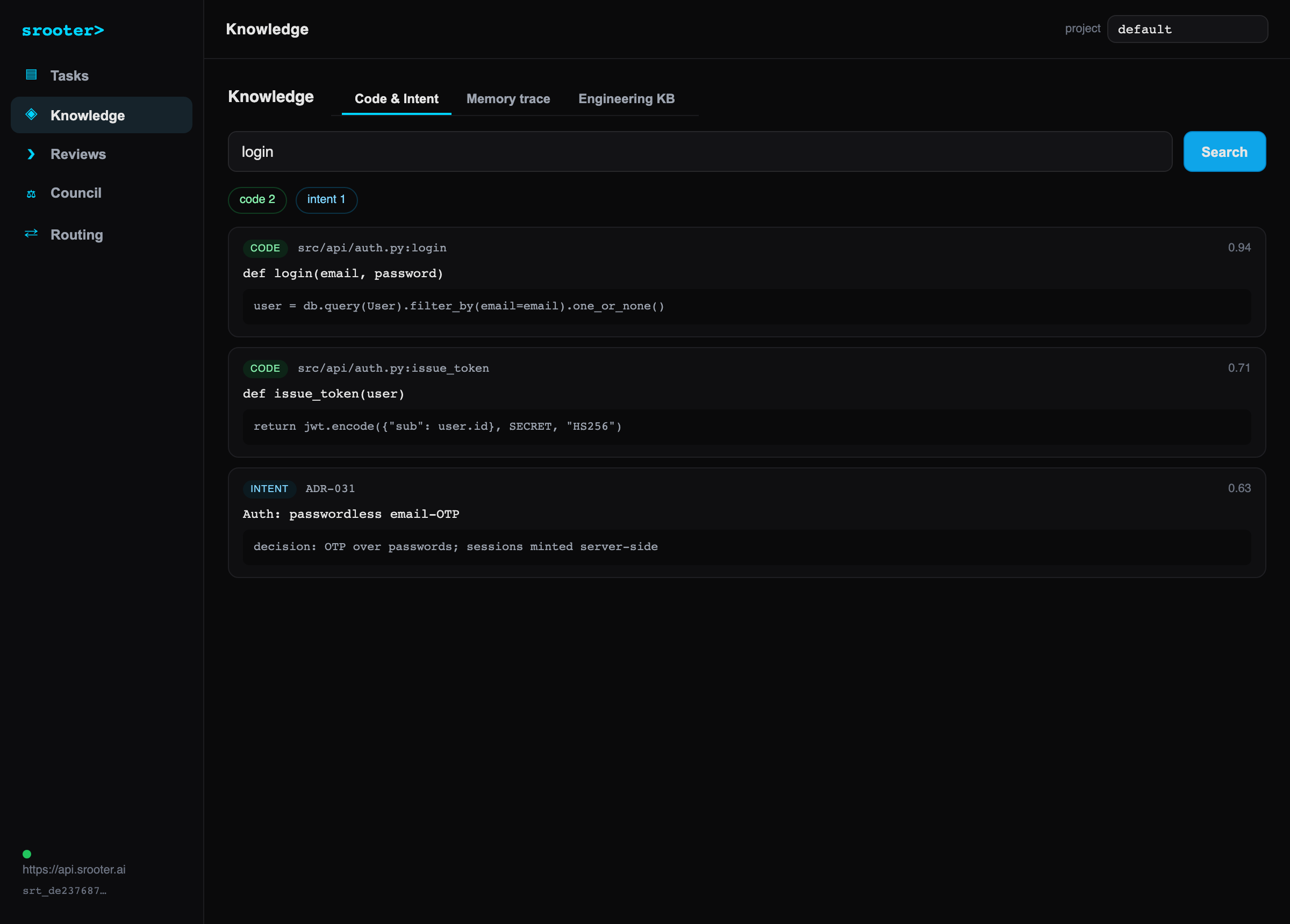
New here? Download Studio or the CLIs, then sign in: the in-app Getting started guide walks through your first task.
The srooterctl coding CLI
Run srooterctl to open a coding session in your project, or srooterctl -p "…" to run one task and exit. It replaces claude or codex in your workflow. The coding agent talks only to your srooter gateway, so routing, budgets, policy, audit and cortex apply to every request. srooterctl checks the agent against a signed release before every run, and srooterctl update updates it.
srooterctl                           # interactive session in this directory
srooterctl -p "summarize src/index.ts"   # one task, then exit (CI-friendly)
srooterctl --continue                # continue your last session (--resume <id> for one)
srooterctl --continue-claude         # pick up a Claude Code session (--continue-codex: Codex)
srooterctl code [--] <args…>          # pass any other agent flag through unchanged
srooterctl review [base] [--yes]     # council review; exit 0 approve, 1 changes requested
srooterctl doctor                    # check the agent, clients and your key
Unknown words are never guessed as a prompt: srooterctl fix the test stops and suggests srooterctl code -p "fix the test". The srooter-agent command still works and starts through srooterctl. Settings come from flags, then env (SROOTER_URL, SROOTER_MODEL, and SROOTER_PROJECT for the cortex project to ground in), then ~/.srooter/config, which login writes.
Permissions: read-only tools always run; write and shell tools prompt for approval in a session ([y] once, [a] always, [n] deny). In non-interactive runs they are denied unless you pass --dangerously-allow-all.
Command reference
Slash commands (in a session)
/helpList every command./model [id]Show or switch the active model./contextToken usage and spend for this session./configShow the resolved gateway, key and model./doctorCheck the gateway is reachable and your key works./clearClear the on-screen transcript./cortex Search your org code graph over the gateway./review [base]Send the branch diff to the multi-model review council./loop Run a task autonomously, heartbeat-bounded./monitorLocal sessions, token totals, spend, scheduled count./schedule …add / list / rm cron-scheduled prompts./workflow Run a multi-step JSON workflow (steps as sub-agents).Flags (after srooterctl code)
--continueResume the latest session.--model Pick the model for this run.--gateway Override the gateway URL.--pinServe the requested model verbatim (skip routing), for benchmarks.--max-turns Cap autonomous turns.--dangerously-allow-allSkip permission prompts (unattended / CI).Autonomy and orchestration
- /loop <task> runs a task autonomously. After each turn the gateway heartbeat decides whether the agent stopped prematurely and should keep going, injecting its nudge as the next turn. The gateway enforces a per-session budget and a limit of 25 iterations.
- Sub-agents the model can call run_subagent to delegate a focused subtask to a fresh child agent: its own context, the same tools, one level of nesting (no recursion). The child is non-interactive, so side-effecting tools only run when the parent granted allow-all. Use sub-agents for focused research or independent tasks.
- MCP (on by default) configure servers in ~/.srooter/mcp.json (user) and .mcp.json (project). Their tools load automatically as server__tool, permission-gated like any write tool. A broken server is logged and skipped, never fatal.
Ops, scheduling and workflows
srooterctl code monitor            # sessions, token totals, spend, scheduled count
srooterctl code schedule           # fire any due scheduled tasks once (cron tick)
srooterctl code schedule run       # foreground scheduler: tick every minute
srooterctl code workflow wf.json   # run a multi-step workflow
- /schedule add <m h dom mon dow> :: <prompt> · list · rm <id>. Stored in ~/.srooter/agent/schedule.json; fire them with schedule (one tick, wire to system cron) or schedule run (foreground).
- /workflow <file> a JSON of steps { name, steps: [{ id, prompt, dependsOn? }] }. Steps run in dependency order (independent steps in a level run concurrently); a step prompt can reference an earlier step's output with {{stepId}}. Each step runs as a sub-agent.
Cortex and review
- Cortex the model can call a search_cortex tool that queries your org's code graph over the gateway, so it grounds in real symbols, not just local grep. /cortex <query> runs it directly. Needs an indexed project (SROOTER_PROJECT).
- Review srooterctl review [base], or /review in a session, sends your committed branch (from the merge-base with origin/<default branch>, or the base you give) to the gateway's multi-model review council and prints the verdict with file:line findings. It lists the files and bytes and asks before sending. .env*, *.pem, *.key, *secret* and id_rsa* files are never sent, and the diff is capped at 120,000 characters. The council reads the diff; it does not run your code. See srooter review.
Routing rules
srooter classifies every request into a tier and routes it to the model assigned to that tier. You configure the assignments in your dashboard. Defaults:
trivialCommits, formatting, housekeeping → cerebras (fast, cheap).substantiveThe main coding tier → glm (the everyday workhorse).long_contextConversations over the token threshold (default 60k) → glm.thinkExplicit extended-thinking requests → deepseek-pro.architecture / securityHigh-stakes intents → the council chief (claude-opus).Change them in your dashboard at Routing: pick the model per tier, the intent-classifier model, the council members, and the long-context threshold. A live preview scores your config on speed, cost and quality and the blended $/1k tokens, with a baseline comparison against running one frontier model for everything. Changes apply to new requests; reset to srooter defaults anytime. Hard caps (model allowlists, max reasoning effort, speed tier) live under Policies.
Cortex code graph
Cortex is an iCPG (intelligent code property graph), your org's knowledge of its own code: symbols, dependency edges, and intent pulled from docstrings. Once a repo is indexed, coding sessions answer "where is X" from the graph, and coding sessions and risk reviews use it to see what a change touches.
srooter is the cortex CLI that install.sh sets up next to srooterctl.
srooter cortex build .         # index this repo (project auto-detected)
srooterctl cortex .            # same, using your saved key + gateway
srooter cortex build . --force # force a re-index
srooterctl cortex-hook on      # auto-index on every Claude Code session
srooterctl doctor             # verify ("cortex auto-index: OK")
Browse it in your dashboard at Cortex: search across code, intent and memory, a clustered graph view, stats, and the intent nodes (goals, invariants, decisions) captured from your code.
Agent Codemap
A CODEMAP.md is a machine-first map an AI agent reads first to orient in a repo: what the system is, where things live, how a request flows, and the invariants not to break, instead of burning dozens of tool calls crawling the tree. Where AGENTS.md and CLAUDE.md give the agent the rules, the Codemap gives it the map. srooter generates it from your code graph, and --check flags a stale map. It is plain Markdown, so any agent can read it (Claude Code, Codex, Cursor, Windsurf, OpenCode).
srooter cortex codemap .           # preview a fresh map (stdout)
srooter cortex codemap . --write   # write / refresh CODEMAP.md
srooter cortex codemap . --check   # validate anchors + freshness (exit 1 on error)
srooterctl codemap .               # same, using your saved key
# also: /codemap in a srooterctl session, Studio Knowledge Refresh CODEMAP.md
The generator owns the deterministic sections (architecture, module map, danger zones) and drafts the rest with confidence markers for you to curate. --check gates writes and runs on session start, so a stale or broken map is caught, never silently trusted. See ADR-067.
Skills
Skills inject your engineering practices into the model, per intent. srooter ships four default skills:
tdd-enforcerStrict TDD: RED, GREEN, VALIDATE, with 80% coverage minimum.security-baselineNo hardcoded secrets, parameterized queries, bcrypt/argon2, input validation.quality-gatesMax 20 lines/function, 3 params, 2 nesting levels, 200 lines/file.python-conventionsType hints, Pydantic, pytest, ruff plus mypy, pathlib.Skill-aware routing: for one-shot tasks such as a slide deck, dashboard, landing page or polished doc, routing can add a matching skill and upgrade the model for that request. Define your own org-wide skills (name, directive, intents, soft or hard enforcement, priority) at Skills, and personal ones, layered on top of org policy, never overriding governance, at My skills.
Session memory
Mnemos is srooter's working memory per coding session. For Anthropic-format traffic it records the session's opening request, the files it edited or wrote, and tool errors, and it checkpoints them as the session gets long. Today it is a record for you to inspect: its content is not added back into your agents' requests.
Inspect it in your dashboard at Mnemos: sessions with their latest checkpoint (goal, active constraints, a fatigue score) and the typed nodes (Goal · Constraint · Error · Decision · Result).
Risk reviews
Risk reviews catch changes that touch sensitive surfaces: auth, tenant scoping, secrets. A fast guard model scores each change out-of-band; when the score is high, a frontier reviewer model (claude-opus) checks the approach and adds corrective guidance to the agent's next turn. Risk reviews do not block the developer.
Review events in your dashboard at Risk: each shows a severity, the findings (which dimensions fired, with evidence), the corrective guidance, and buttons to mark the outcome (confirmed / incident / dismissed / trivial) so the threshold tunes to your codebase.
Sign up and start coding
Sign up with an email code and your org is created. Then run srooterctl login, and each request gets an audit record. See Privacy for what is stored, and for how long.
Get started →